Shop Smarter for an EV or Hybrid in Minnesota: Try Our New Tool
Choosing an electrified vehicle is exciting. It can also bring up a few big questions fast: How far can I drive? What will charging look like at home? Could I actually save money?
That is why JeffBelzer.com now features the Lectrium Dashboard, a new shopping tool designed to help you feel confident while browsing electrified inventory.
With this enhancement to our website, these features are just a couple of clicks away:
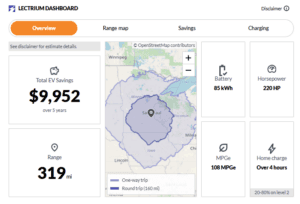
- Get a quick snapshot of range, efficiency, battery details, and more (on applicable vehicles)
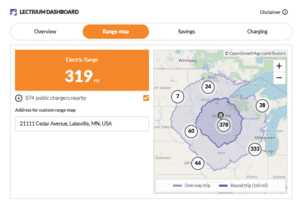
- Explore an interactive range map to visualize everyday driving and weekend trips
- Compare estimated ownership savings and view available incentives
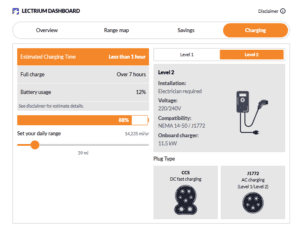
- Check charging information so you can plan for home and public charging
Electrified options we carry: BEV, PHEV, HEV, and more
Not every “electric” vehicle is the same, and that is where many shoppers get stuck. At Jeff Belzer’s you will find a mix of electrified options, including:
- BEV (Battery Electric Vehicle): Fully electric. No gas engine. You charge it.
- PHEV (Plug-in Hybrid Electric Vehicle): Electric driving for shorter trips plus a gas engine for longer drives. You can plug it in and fill it up.
- HEV (Hybrid Electric Vehicle): Gas engine plus electric assist. No plug. Great for simple ownership.
- MHEV (Mild Hybrid): A gas engine with light electric support. No plug.
The Lectrium Dashboard helps make those differences easier to understand while you shop, so you can focus on the option that fits your routine.
Where to find the Lectrium Dashboard
When you are browsing our new hybrid and EV inventory and used EVs and hybrids, look for the Lectrium Dashboard. It is built to be used while you are actively viewing vehicles, not after you leave the listing.
Three ways the tool helps you shop with confidence
1) Get answers faster with the “at-a-glance” overview
Instead of digging through multiple pages to piece together details, the Dashboard puts key electrified highlights in one place. It is a fast way to compare vehicles when you are deciding what to click next.
2) Use the interactive range map to picture real-life driving
Range numbers are helpful, but seeing range on a map is even better.
The range map lets you visualize potential driving distance and compare one-way and round-trip planning. It is a quick confidence check for commutes, school drop-offs, errands, and road trips.
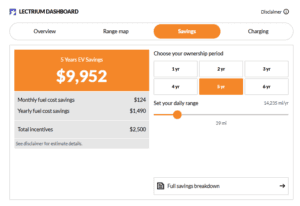
3) Explore estimated savings and incentives in one spot
If you are considering an EV or hybrid to lower running costs, the savings and incentives tools help you start the comparison. They are designed to give you a clearer picture of potential cost savings versus the average vehicle on the road today as well as available incentive programs, without needing a spreadsheet.
A quick, important disclaimer
This tool is provided by Lectrium, an independent third-party electrified data provider. Information shown is based on model-level data and standardized assumptions. It is meant to be educational guidance – these estimates may vary from reality, depending on vehicle wear, driving behavior, climate/weather, etc.
Try our EV/Hybrid shopping tool on your next website visit
If you are shopping for a BEV, PHEV, HEV, or MHEV in Minnesota, do not just scroll through the listing. Open the Lectrium Dashboard and use it to compare:
- Range and efficiency
- Charging needs
- Savings estimates and incentives
- The range map for your driving area
When you are ready, schedule a test drive and our team will help confirm the details for the exact vehicle you are considering.
Our Dealership Locations
-

- Lakeville, Minnesota
-

- New Prague, Minnesota
-
- Roseville, Minnesota
 2026 Chrysler Pacifica vs Kia Carnival | Jeff Belzer’s
Brand Battle, Chrysler, Kia
 Jeep Grand Cherokee vs. Jeep Grand Cherokee L: What is the Difference?
Jeep, New Vehicles, Used Vehicles
 The Next-Generation 2027 Silverado: What Minnesota Shoppers Need to Know Before Arrival
Chevrolet, New Vehicles